Educational Technology
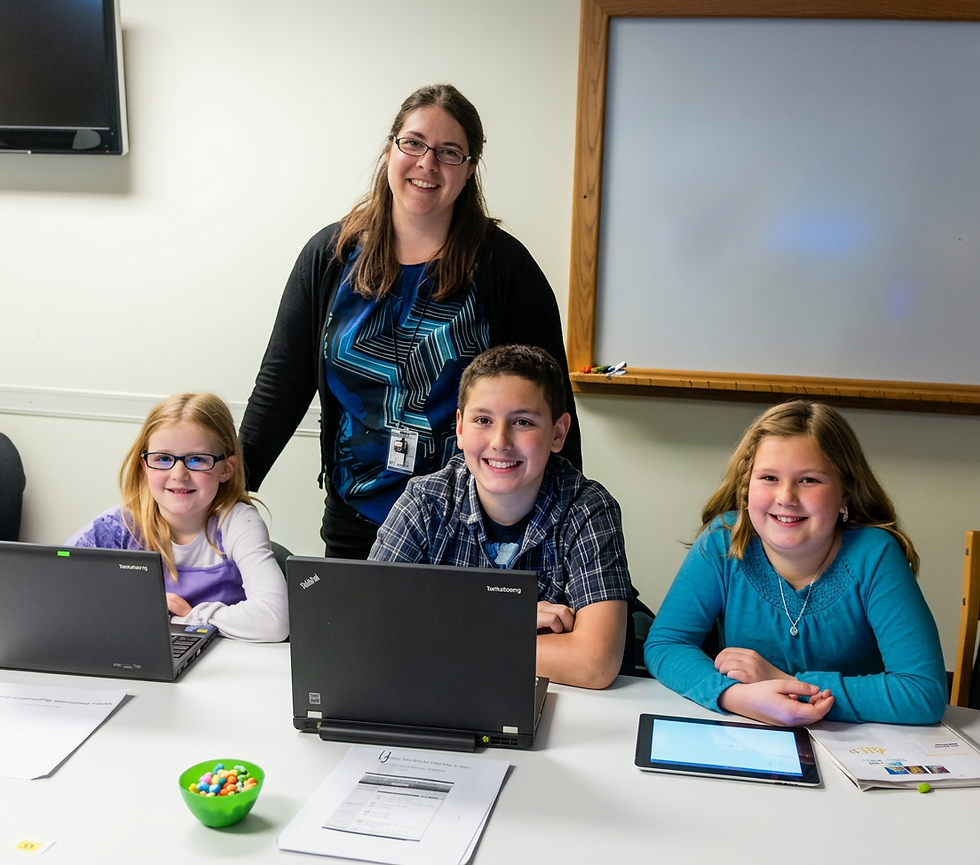
Fifth-grade students preparing to present at a digital learning showcase
My Educational Technology Journey & Philosophy
My Educational Technology Philosophy
My philosophy of educational technology has continued to evolve. I believe technology can be a powerful tool for creating learning experiences that are more student-centered, creative, collaborative, accessible, and engaging. Digital tools can give students opportunities to create, communicate, solve problems, receive feedback, and demonstrate their learning in ways that would not otherwise be possible.
At the same time, technology can be overused. The decision to use technology should begin with the learning goal, not the tool. I consider what students need to learn, what they need to do in order to learn it, and whether technology meaningfully improves that experience. Sometimes the best tool is digital; sometimes it is a conversation, a book, paper and pencil, or hands-on materials.
My goal is not to integrate technology simply because it is available, but to leverage technology when it makes learning more meaningful, creative, efficient, or student-centered.
Technology Enhanced Learning
Civil War Journals: Digital Storytelling
As part of a fifth-grade Civil War unit, students participated in Easy Simulations: Civil War by Tim Bailey. Throughout the simulation, students assumed the perspective of Civil War soldiers and wrote journal entries responding to the events and experiences they encountered.
Students then worked collaboratively to transform their writing into digital stories. Each group selected one journal entry from each member to include in its final production. Students dressed in period-inspired costumes, selected historical images to complement their writing, recorded themselves reading their journal entries, and combined the images, narration, and video using iMovie on iPads.
The technology served as a tool for authentic publication and historical storytelling, allowing students to move beyond written journal entries and communicate their understanding through a multimedia experience. The project integrated historical content, perspective writing, speaking, collaboration, visual communication, and digital media production.
Technology Integration: iPads • iMovie • Digital Images • Audio Recording
Student Skills: Historical Perspective • Writing • Speaking • Collaboration • Media Creation • Digital Storytelling
Inside Earth: Green Screen Documentary
While studying geology, fifth-grade students watched the Inside Earth video on Discovery Education to build their understanding of Earth’s internal structure and geological processes. After viewing the original documentary, students received a version of the video with the narration removed and were challenged to create their own documentary narration to accurately explain the visuals on screen.
Students analyzed the video, determined what scientific information needed to be communicated, and collaboratively wrote scripts that synchronized their explanations with the visual content. They then became the documentary narrators, recording themselves in front of a green screen. Their recordings were combined with the original video footage to create student-produced science documentaries.
Rather than simply consuming digital content, students reinterpreted and recreated it, requiring them to demonstrate their understanding through writing, speaking, timing, and visual communication. The green-screen technology provided an authentic context for students to communicate scientific knowledge while developing multimedia production skills.
Technology Integration: Green Screen • Video Editing • Digital Video • Audio/Video Recording
Student Skills: Science Communication • Script Writing • Speaking & Listening • Collaboration • Visual Literacy • Digital Media Production
Rock Cycle: Claymation & Stop-Motion Storytelling
While studying the rock cycle, fifth-grade students were challenged to tell the story of a rock as it traveled through the different stages of the rock cycle. Their stories incorporated required science vocabulary and accurately explained the processes that transformed their rock over time.
Students then brought their stories to life by creating clay models and producing stop-motion videos to illustrate each stage of the journey. The finished videos combined scientific understanding, narrative writing, visual design, and digital media production.
Technology allowed students to make an abstract scientific process visible, demonstrating their understanding through creation rather than simply recalling information.
Technology Integration: Stop-Motion Animation • Digital Video • Claymation
Student Skills: Science Communication • Content Vocabulary • Narrative Writing • Creativity • Collaboration • Digital Media Production
A Quiet Place: Digital Class Book
After reading A Quiet Place by Douglas Wood, students wrote descriptions of a quiet place that was personally meaningful to them, using sensory details to help readers visualize and experience the setting. Students illustrated their quiet places and then used Book Creator to publish their writing and artwork in a collaborative class book inspired by the mentor text.
Digital publication provided students with an authentic audience for their writing while combining literacy, visual art, and technology. Rather than using technology to replace the writing process, students used it to publish and share work they had already thoughtfully developed.
Technology Integration: Book Creator • Digital Publishing • Student Artwork
Student Skills: Descriptive Writing • Sensory Details • Visual Communication • Creativity • Digital Publishing
Instructional Design & Online Learning
Reflections on Learning
This video documents how I applied concepts and strategies from my Master’s program in Educational Technology directly to my fifth-grade classroom. As I progressed through graduate school, I intentionally experimented with new approaches to technology integration and incorporated them into our We the People unit of study.
Rather than adding technology as a separate component, I used digital tools to enhance and extend the existing curriculum, creating opportunities for students to interact with content, communicate their understanding, collaborate, and create in new ways. The experience allowed me to put educational technology theory into practice while continually reflecting on which tools and strategies genuinely improved the learning experience.
This project represents an important stage in the development of my educational technology philosophy: moving from simply using technology in instruction to intentionally designing learning experiences in which technology serves a clear instructional purpose.
Design of Evaluation and Instruction
My graduate studies in Educational Technology strengthened my understanding of systematic instructional design and the alignment of learning objectives, instruction, and assessment. Using the ADDIE model, I learned to begin by analyzing learner needs and instructional goals before selecting strategies or technology.
This project demonstrates my application of the complete instructional design process, from needs assessment and learning objectives to lesson development, implementation, and evaluation. I used learner data to guide instructional decisions, aligned assessments with objectives, incorporated scaffolding and motivational strategies, and evaluated both student performance and the effectiveness of the instruction.
My work with educational technology has extended beyond integrating digital tools into my own classroom. Through graduate study and professional experience, I have designed online and blended learning experiences, digital citizenship instruction, STEM and coding programs, technology-integrated curriculum, and professional learning opportunities. I have also supported colleagues in using technology purposefully and evaluated instructional programs to identify strengths and opportunities for improvement.
These experiences have allowed me to apply educational technology from multiple perspectives, as a teacher, curriculum designer, instructional designer, program evaluator, and technology resource for other educators.
Online & Blended Learning
I have designed online and blended learning experiences that combined digital resources, face-to-face instruction, collaboration, and authentic learning tasks.
Online Teaching & Learning
During the transition to remote learning, I adapted classroom instruction for an online environment, using digital resources, video conferencing, and formative assessment strategies to maintain student engagement and support learning from a distance. This experience strengthened my understanding that effective online instruction requires more than transferring a face-to-face lesson to a screen; learning experiences must be intentionally redesigned for the digital environment.
Digital Communication & Parent Support
During remote learning, I created a digital parent presentation that served as an online version of a traditional back-to-school orientation. The presentation provided families of remote learners with the information they needed to understand expectations, routines, technology, and learning procedures in the online environment.
Creating the resource required me to consider the remote-learning experience from the family's perspective and communicate information in a format that was clear, accessible, organized, and available for families to revisit as needed.
Professional Learning & Educator Support
I have planned and facilitated professional learning experiences designed to help educators strengthen instruction and integrate technology effectively. These sessions included opportunities for teachers to explore resources, develop practical skills, collaborate with colleagues, and apply new learning directly to their classrooms.
Professional Development Agenda
I have experience planning and facilitating professional development for educators focused on the purposeful use of educational technology. Working collaboratively with a colleague, I designed and delivered staff development that introduced teachers to educational applications and provided opportunities to explore how the tools could support classroom instruction.
This experience expanded my role with educational technology beyond my own classroom by allowing me to share resources, model technology integration, and support colleagues as they developed their own technology skills and instructional practices.

Data-Informed Professional Learning
When planning technology professional development, I used pre- and post-training surveys to identify teachers' needs, prior knowledge, confidence levels, and areas requiring additional support. Survey results helped my colleague and me determine the focus of upcoming training and identify areas where follow-up instruction or resources were needed.
This needs-analysis process was used across professional learning opportunities, including training on Promethean technology, ActivInspire, and other district-supported educational technologies. The ActivInspire survey shown here is one example of how I used teacher feedback to inform the design and evaluation of professional development.

Wet Your "App"etite Digital Library
I created Wet Your “App”etite, a digital resource library designed to help teachers discover and evaluate educational applications for classroom use. Rather than simply compiling links, I previewed each application and provided descriptions of its instructional uses and potential benefits so teachers could more easily determine which tools might support their learning goals.
The library provided colleagues with an accessible, organized resource for exploring educational technology and reflects my experience evaluating digital tools, curating instructional resources, and supporting educators with technology integration.
Digital Resource Development & Curation
I created digital resource libraries to provide teachers with organized, easily accessible instructional materials and technology resources. Resources were selected and organized around instructional needs so educators could efficiently locate materials and incorporate them into their teaching.
Technology Mondays
Challenge: Teachers were using increasingly more digital tools and needed practical, accessible support they could immediately apply in their classrooms.
Solution: I created Technology Mondays, an ongoing professional-learning series designed to provide teachers with manageable, classroom-ready technology tips and resources.
Implementation: I developed and shared short tutorials and resources focused on specific digital tools and instructional applications, giving teachers opportunities to build their technology skills over time.
Impact: Technology Mondays provided colleagues with ongoing, just-in-time professional learning and created a consistent way for me to share resources, answer questions, and support technology integration across the school.
Training Focus: • Student-created demonstrations • Visible thinking • Multimedia response • Formative assessment • Student voice and choice
I designed and facilitated a Technology Monday session introducing educators to Explain Everything, an interactive whiteboard application I had successfully integrated into my own classroom. Rather than focusing solely on how to use the tool, the session explored ways students could use technology to create, explain, and demonstrate their learning, providing teachers with opportunities to make instruction more student-centered and assessment more authentic.
In this example, a fifth-grade student used Explain Everything to demonstrate his understanding of the area model strategy for multiplication. As he worked through the problem digitally, he visually represented each step of the strategy and showed how the partial products combined to produce the final answer.
Although the student did not record his narration, the progression of his work makes his mathematical thinking visible. This artifact demonstrates how technology can be used as a formative assessment tool, allowing students to show their problem-solving process rather than simply provide a final answer.
Technology Monday Lesson: Explain Everything
Technology Monday Lesson: Using Apple TV
Training Focus: • Classroom technology • Student sharing • Interactive learning • Technology integration • Asynchronous teacher support
When Apple TVs were installed in our classrooms without formal district training, I designed and facilitated a Technology Monday session to help teachers use the new technology effectively. In addition to demonstrating the technical setup and operation of Apple TV, I modeled instructional applications that allowed students to wirelessly share digital creations from their iPads to the classroom Promethean Board, creating opportunities for sharing, discussion, and collaborative learning.
To support teachers who were unable to attend the live session, I also created a step-by-step video tutorial they could access independently.

Technology Committee Leader
As Technology Committee Leader, I helped support the effective integration of educational technology across the school. My work included collaborating with colleagues to identify technology needs, planning and facilitating professional development, evaluating educational applications and resources, and providing teachers with ongoing technology support.
As Technology Committee Leader, I developed a school technology plan to guide the purposeful integration of technology across our school. The plan provided a framework for identifying technology needs, establishing priorities, supporting implementation, and providing teachers with the training and resources necessary to use technology effectively.
My leadership extended beyond developing the plan to supporting its implementation through needs assessments, professional development, ongoing technology tutorials, resource curation, and collaboration with colleagues.

Technology Leadership
Twenty-First Century Classroom Pilot
As one of five teachers selected by the West Ada School District to pilot a Twenty-First Century Classroom, I participated in an initiative connected to a study conducted by Digital Promise. My classroom was equipped with a variety of instructional technologies, giving me the opportunity to explore how increased access to digital tools could impact teaching, student learning, and student satisfaction.
At the beginning of the pilot, I believed technology might be the silver bullet for improving learning. I enthusiastically integrated technology into nearly every aspect of instruction, assuming that more technology would naturally lead to greater engagement and better outcomes. Through trial, reflection, and experience, I discovered that this was not always the case. Technology could transform learning when it served a clear instructional purpose, but it could also complicate or distract from learning when a simpler approach would have been more effective.
That realization ultimately led me to pursue a Master’s Degree in Educational Technology. I wanted to move beyond knowing how to use digital tools and develop a deeper understanding of the research, instructional design principles, and best practices that should guide technology integration.
Technology Committee Leader
As Technology Committee Leader, I helped support the effective integration of educational technology across the school. My work included collaborating with colleagues to identify technology needs, planning and facilitating professional development, evaluating educational applications and resources, and providing teachers with ongoing technology support.
As Technology Committee Leader, I developed a school technology plan to guide the purposeful integration of technology across our school. The plan provided a framework for identifying technology needs, establishing priorities, supporting implementation, and providing teachers with the training and resources necessary to use technology effectively.
My leadership extended beyond developing the plan to supporting its implementation through needs assessments, professional development, ongoing technology tutorials, resource curation, and collaboration with colleagues.
Curriculum & Content Development
The Next Chapter of My Educational Technology Journey
The next chapter of my educational technology journey is to bring together what I have learned through years of classroom experience, technology integration, collaboration with educators, and graduate study in learning theory and instructional design.
My goal is to use this combination of experience and expertise to design engaging, research-based educational materials and learning experiences that can be implemented by other educators. By moving from designing primarily for the students in my own classroom to developing curriculum and content for broader use, I hope to extend the impact of my work and contribute to improved learning outcomes for many more students.
I want to create resources that are not only innovative and engaging, but also purposeful, accessible, instructionally sound, and practical for educators to implement.
My goal is to use what I have learned from teaching, technology, and instructional design to create learning experiences that make a meaningful difference, at a scale beyond my own classroom.
What Others Say
“In this classroom, it is striking to see how students are propelled by their own inertia, rather than by the typical reminders from a teacher.” -Digital Promise, National Education Nonprofit
"Kaycie has distinguished herself as a leader within both our school and district. She has served as an active member of our District Technology Team, where she played an instrumental role in promoting meaningful technology integration and supporting colleagues in the effective use of instructional technology." -Valerie Berg, Principal